WhatsApp Restaurant Table Booking for India
wachatly lets Indian restaurants take table bookings on the WhatsApp number they already use. A guest messages hi, picks date, time and party size in the chat, pays an optional Razorpay advance and gets a confirmation, while your manager gets an alert. Your number is linked by scanning a QR code, with no Meta approval.
1-day free trial · paid monthly plans in INR · no per-message fees
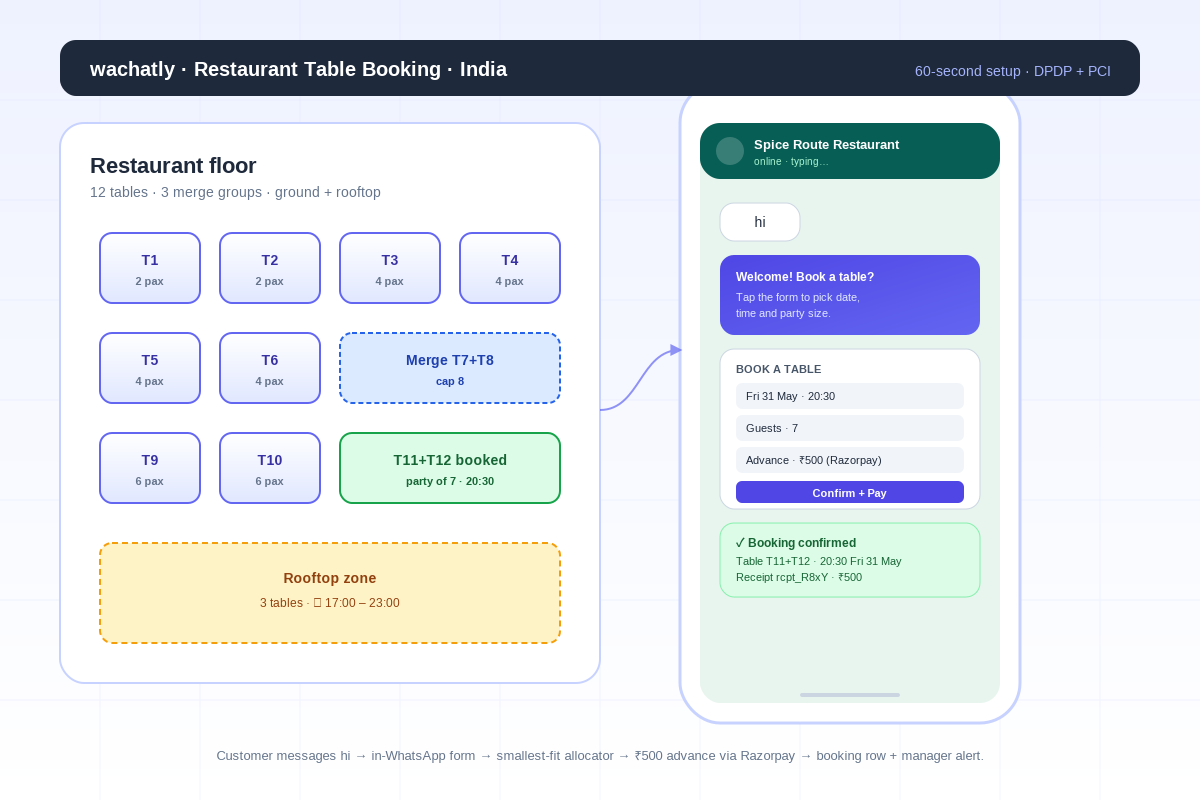
How does WhatsApp table booking work?
From customer first ping to confirmed booking, no human in the loop unless you want one.
Customer messages hi
Any of your published WhatsApp entry points fires — print on the menu, the Google Maps profile, an Instagram CTA, a QR at the entrance. The customer just types hi.
The chatbot asks the details
A wachatly chatbot flow asks date, time, guests, name and special requests as plain chat messages. No app to download, no website to load. Answers are checked before the booking is made.
Allocator + advance
The allocator picks the smallest table that fits, or the smallest merge group you allowed. If you set an advance, a Razorpay link collects it inside WhatsApp.
Confirmations + booking row
Customer gets a WhatsApp confirmation with the booking summary and receipt. Manager gets a heads-up message. A booking row is written that you can see, edit, and export.
Why use WhatsApp for restaurant bookings?
The booking channel meets the customer where they already are — not where a marketing team wishes they were.
No app to install
Your guests already use WhatsApp. They book by messaging the number they already know, with no download, signup or password.
Advance payments for no-shows
An optional Razorpay advance asks guests to commit when they book, and you choose the amount for your restaurant.
Manager workflow stays simple
Bookings appear in an admin panel and, if you like, a Google Sheet. Phone reservations can still be added by hand.
Your own number, linked by QR
Scan a QR code once, like WhatsApp Web. No Meta approval, INR billing and no per-message fees.
Smallest-fit single → smallest-fit merge group
You tell the system which tables can combine. The allocator does the rest. Party of 4 with a 4-seater free — that wins, no merge. Party of 7 with no 8-seater free — the allocator picks the smallest merge group you allowed whose combined capacity is at least 7.
- Never combines tables you have not allowed.
- Respects active / inactive toggles per table and per merge group.
- Honours slot duration + buffer (default 90 + 15 min) — no double-booking.
- Idempotent — duplicate webhook will not double-charge or double-book.
Example allocation
Four preset cards — pick yours and ship
Each preset writes a starter table inventory, sane slot + buffer defaults, and a suggested advance amount. Tune everything later.
Fine Dining
8–14 tables · 2/4/6 mix · merge to 8
Advance default ₹500
Slot 120 min · 15 min buffer · private room as separate zone
Casual Dine
12–20 tables · 2/4 mix · merge to 6
Advance default ₹300
Slot 75 min · 10 min buffer · rooftop zone toggle
Cafe / QSR
6–10 tables · 2/4 mix · no merge
Advance default ₹150
Slot 45 min · no buffer · single zone
Banquet Hall
1–3 halls · 30/60/120 cap · no merge
Advance default ₹2,000
Slot 240 min · 60 min buffer · separate halls as separate tables
Compare wachatly to other tools
Deeper reads on WhatsApp for restaurants
Restaurant table booking: common questions
How does WhatsApp table booking work with wachatly?+
A guest messages hi to your restaurant number. A chatbot flow asks for date, time, party size, name and any special requests, the allocator picks a free table, and a Razorpay link collects the advance if you set one. The guest gets a confirmation and your manager gets an alert, all in WhatsApp.
How does the table allocator pick a table?+
It picks the smallest single table that fits the party first. If no single table fits, it looks at the merge groups you set up and picks the smallest combination with enough seats. It respects slot length, buffer time and tables you mark inactive, and it never combines tables you have not allowed.
Can I take an advance payment for bookings?+
Yes. You set the advance amount for your restaurant, or turn it off. The guest pays through a Razorpay link inside the chat, and the money settles to your own Razorpay account. wachatly receives only the payment ID and status, never card or UPI details. Refunds are handled from your Razorpay dashboard.
Do I need the official WhatsApp Business API or Meta approval?+
No. wachatly links the number you already use by scanning a QR code, like WhatsApp Web, in about two minutes. There is no Meta approval and no template review. Booking questions appear as plain chat messages with numbered options, and confirmations are saved messages that are ready to use immediately.
What happens if a guest wants to cancel or reschedule?+
The guest messages your number and the chat appears in the shared team inbox. Your manager updates the booking from the admin panel to cancel, reschedule or mark a no-show. Bookings can also be written to Google Sheets, so the team can see the day’s reservations in a sheet they already use.
How much does restaurant table booking cost?+
Table booking is part of wachatly. You start with a 1-day free trial that includes 100 campaign messages, then choose a paid monthly plan in INR. There are no Meta per-message fees because your number is linked by QR. See the pricing page for the plans that include table booking.
Ship WhatsApp table booking this week
30-minute call. We map your tables, merge groups, and advance amount live, and you walk away with a working booking flow.